Real-time dashboards that unify multi-entity financial insights

schedule a demo with Gravity Software
x

Gravity Software Insights | Dashboards

Monitor financial KPIs, cash flow, and performance across all your entities with customizable dashboards built for growing businesses.

  • See the big picture across all your entities
  • See the big picture across all your entities

    Managing multiple companies, departments, or locations shouldn't mean switching between accounting systems or combining spreadsheets just to understand financial performance. Gravity Software brings your financial data together in one database, with real-time dashboards that help you monitor key performance indicators (KPIs), cash flow, accounts payable, and performance across your entities.

    Whether you're reviewing activity for an individual company or evaluating results across your organization, Gravity's dashboards make it easier to identify trends, monitor transactions, and find information that needs attention.

    See how Gravity’s dashboards deliver instant clarity across all your entities — schedule your demo today.

  • Explore Gravity's real-time dashboards in this quick demo
  • Explore Gravity's real-time dashboards in this quick demo

    Watch how CFOs, controllers, and accounting teams use Gravity Software's dashboards to review financial activity and navigate information across multiple entities.

    In this video, discover how Gravity's dashboards help you:

    • Monitor financial KPIs: Track cash flow, accounts payable, customer balances, and other key financial metrics.
    • View multi-entity performance: Access financial information across multiple companies, departments, and locations.
    • Explore financial activity: Use dashboard visualizations to better understand financial performance.
    • Access centralized financial data: Review financial information without switching between separate accounting systems.
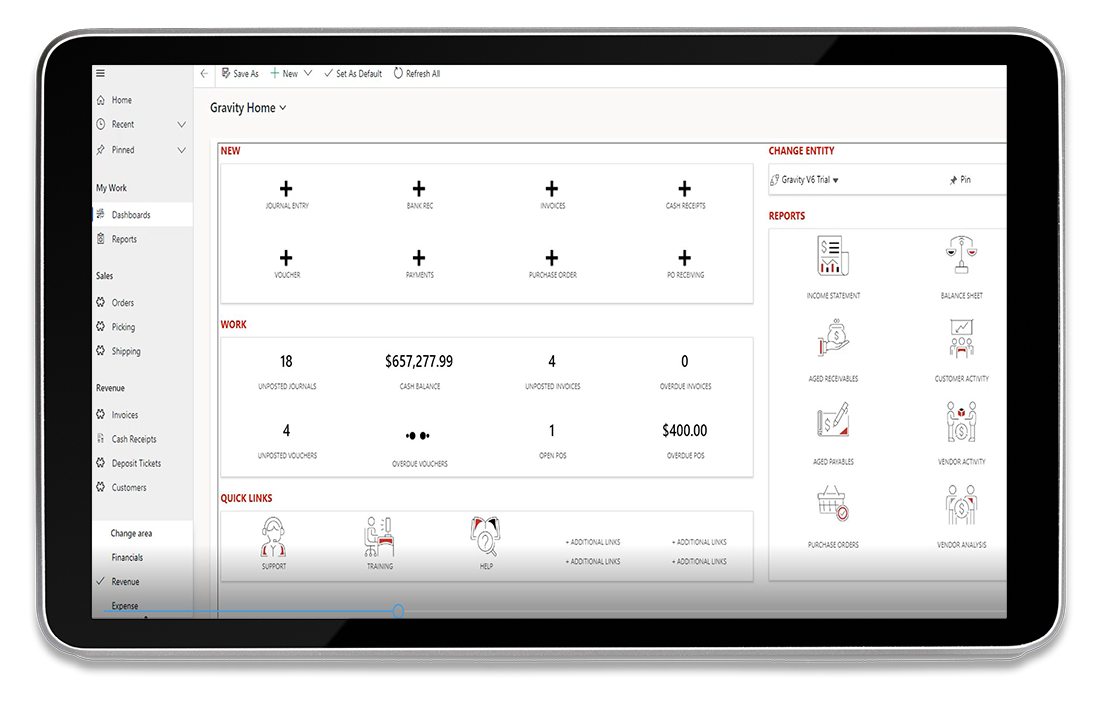
    Gravity Software accounting dashboard displayed on a tablet, showing cash balances, financial KPIs, overdue invoices, purchase orders, and reporting shortcuts.

    Built-in dashboards for real-time financial visibility

    Gravity Software's built-in dashboards give accounting teams a centralized view of daily financial activity. From cash balances and unposted transactions to overdue invoices and purchase orders, users can quickly access the information they need to manage everyday accounting operations.

    As shown in the screenshot, Gravity's home dashboard brings together key financial metrics, frequently used accounting functions, and reporting shortcuts in one convenient workspace. Users can navigate between entities without logging into separate accounting systems.

    With financial information organized in one place, your team can monitor activity, identify items requiring attention, and spend less time navigating between screens.

    Schedule your demo today!

  • Financial dashboards designed for multi-entity accounting
  • Financial dashboards designed for multi-entity accounting

    Gravity Software's financial dashboards help CFOs, controllers, and accounting teams monitor the metrics that matter most. From tracking cash flow and accounts payable to reviewing financial performance across multiple companies, Gravity combines built-in dashboards with the flexibility to create personalized views that support your organization's reporting needs.

    Here's what sets Gravity's dashboards apart:

    1

    Financial KPIs at a glance

    Monitor cash balances, accounts payable, overdue invoices, and other key financial metrics through Gravity Software's built-in dashboards. Quickly identify financial activity that needs attention without navigating multiple accounting systems.

    2

    Real-time financial visibility

    Access up-to-date financial information directly from Gravity Software's centralized database. Monitor financial activity across multiple entities without switching between accounting systems or manually combining data from separate databases.

    3

    Multi-entity financial and operational visibility

    Monitor financial and operational performance across multiple companies, departments, and locations. Gravity Software's dashboards provide visibility into key business metrics, while dimensional reporting enables deeper analysis by entity, department, location, or project.

    4

    Secure, role-based access to financial data

    Control access to sensitive financial and operational information with Gravity Software's role-based security. Manage permissions by user role and entity so team members can access the dashboards and accounting information relevant to their responsibilities.

    5

    Personalized dashboards

    Create personalized dashboards to monitor the financial and operational information most relevant to your organization. Dashboards can be built by your team or with assistance from a Gravity Software implementation partner, tailored to your reporting needs, business structure, and workflows.

  • How InDevCo streamlined accounting across 90+ entities
  • How InDevCo streamlined accounting across 90+ entities

    Rette Rankin, Controller at InDevCo, Inc.

    InDevCo, a growing real estate and tax consulting firm, needed an accounting solution that could support its expanding multi-entity operations. As the number of companies increased, QuickBooks Desktop made managing financial information and reporting more complex.

    By moving to Gravity Software, InDevCo brought more than 90 entities into a single database, streamlined accounting workflows, and improved financial visibility across its organization. The efficiencies helped InDevCo manage growth without hiring an additional accountant.

    “Gravity streamlined our workflow process and consolidated all of our companies into one user-friendly database. Because of this, we did not need to hire another accountant.”

    — Rette Rankin, Controller, InDevCo, Inc.

    Read the full case study

  • Resources for financial dashboards and multi-entity reporting
  • Resources for financial dashboards and multi-entity reporting

    Explore how Gravity Software combines multi-entity accounting, Microsoft technologies, AI-powered accounting capabilities, and accounting automation to help growing organizations improve financial visibility and streamline operations.

    Power BI integration

    Learn how Gravity Software integrates with Microsoft Power BI for advanced financial dashboards, visualizations, and reporting.

    Finance trends for CFOs

    Explore seven finance trends shaping 2026, including financial visibility, automation, and data-driven decision-making.

    Real estate scalability

    See how InDevCo streamlined accounting across more than 90 entities in one database, improving efficiency and financial visibility.

    Multi-entity guide

    Explore the challenges, best practices, and technology considerations for managing accounting and reporting across multiple companies.

    Core product overview

    Discover Gravity Software's cloud-based accounting capabilities, including multi-entity management, financial reporting, and automation.

    Microsoft 365 Copilot for accounting

    Explore how Microsoft 365 Copilot supports AI-assisted accounting workflows and helps finance teams work more efficiently within the Microsoft ecosystem.

    AI-powered accounting

    Discover how Gravity Software uses AI-powered automation to simplify accounting processes and reduce manual work.

    Power Platform collaboration

    Discover how Gravity Software works with Microsoft 365 applications, including Teams, SharePoint, and Excel, to support connected accounting workflows and collaboration.

    Product demo video

    Watch Gravity Software's 11-minute demo highlights to explore multi-entity accounting, financial dashboards, and everyday accounting workflows.

  • Frequently asked questions
  • Frequently asked questions

    Illustration of a smiling customer support representative wearing a headset.

    Find answers to common questions about how Gravity Software's dashboards work and what to expect when using them across your organization.

    arrow

    What financial information can I view in Gravity Software's dashboards?

    Gravity Software's dashboards provide visibility into key financial and operational information, including cash balances, accounts payable, overdue invoices, purchase orders, and other accounting activities. Users can monitor important metrics and access financial reporting tools from a centralized accounting platform.

    Can Gravity Software dashboards display information across multiple entities?

    Yes. Gravity Software is built for multi-entity accounting, allowing organizations to manage financial information across multiple companies in a single database. Users can navigate between entities and access financial information without logging into separate accounting systems.

    Can I personalize dashboards in Gravity Software?

    Yes. Gravity Software supports personalized dashboards that can be built by your team or with assistance from an implementation partner. Dashboards can be tailored to display relevant financial and operational information based on your organization's reporting requirements.

    How does Gravity Software protect sensitive dashboard information?

    Gravity Software uses role-based security and entity-level permissions to help organizations control access to financial information. Administrators can manage user access based on responsibilities and authorized entities, helping protect sensitive accounting data.

    Does Gravity Software integrate with Microsoft Power BI for advanced dashboards?

    Yes. Gravity Software integrates with Microsoft Power BI to support advanced financial dashboards, interactive visualizations, and business intelligence reporting. Organizations can use Power BI to explore financial performance and analyze information across multiple entities.

    Ready to see what Gravity Software can do for your business?

    Discover how Gravity Software brings multi-entity accounting, financial reporting, dashboards, and automation together in one cloud-based platform. Watch our 11-minute demo highlights to explore the software, then schedule a personalized demo to see how Gravity can support your organization.

    Schedule a demo today!

    schedule a demo with Gravity Software