Dimensional reporting software for multi-entity businesses


Tag transactions by department, location, project, employee or other reporting dimensions, build hierarchical relationships and analyze financial performance across entities—without expanding your chart of accounts.

schedule a demo with Gravity Software
x

See how Gravity compares to leading cloud accounting solutions. Request a demo.

  • What is dimensional reporting software?
  • What is dimensional reporting software?

    Dimensional reporting and hierarchy icon

    Dimensional reporting software allows finance teams to tag transactions with meaningful business attributes—such as department, location, employee, physician, grant or project—without adding more account numbers to the chart of accounts.

    Gravity Software combines dimensional reporting with multi-entity accounting software, giving growing organizations a flexible way to analyze financial activity across companies, departments and other areas of the business.

    Built on the Microsoft Power Platform, Gravity lets you apply dimensions to journal entries, bills, invoices and transaction line items. Finance teams can then use those values in general ledger reports, financial statements, consolidated reports and budgets.

    Dimensions can be introduced as reporting requirements evolve, helping your organization gain more detailed financial insight without restructuring its original chart of accounts.

    Add reporting detail without adding accounts

    Your chart of accounts provides the foundation for financial reporting. Dimensions add flexible details—such as department, location, employee, physician, grant or project—so you can analyze transactions in multiple ways without creating a separate account for every reporting combination.

  • See dimensional reporting in Gravity Software
  • See dimensional reporting in Gravity Software

    Hand selecting a dimensional reporting software demonstration video

    Watch this six-minute product demonstration to see how Gravity’s dimensional reporting software helps finance teams configure dimensions, establish usage rules, tag transactions and create more detailed financial reports.

    In the video, you will see how Gravity can help you:

    • Create dimensions for departments, locations, employees, physicians, grants, projects and other reporting needs.
    • Make dimensions required, optional or unavailable based on the account or transaction.
    • Build parent-child relationships between dimensions.
    • Capture dimension values on journal entries, bills, invoices and transaction lines.
    • Analyze dimensional activity in general ledger reports and consolidated financial statements.
    • Present dimension values as report details or separate columns.
    • Export reports to Excel.
    • Create budgets at the dimension level.


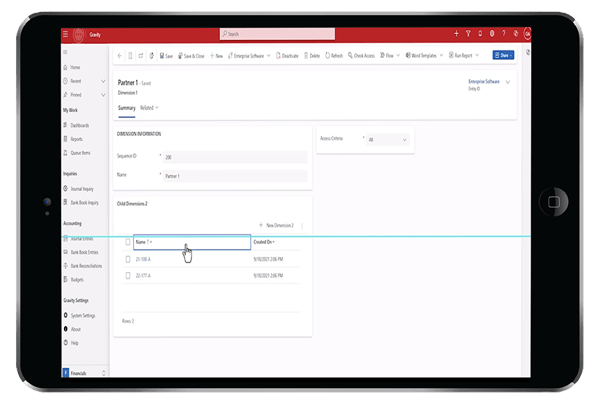
    Gravity Software Dimension 1 screen showing Partner 1 and its child dimensions
  • Apply dimensions consistently across financial transactions
  • Apply dimensions consistently across financial transactions

    Gravity lets you define dimensions that reflect how your organization needs to analyze financial activity. Depending on your business, dimensions may represent departments, locations, employees, physicians, grants, projects, partners or other reporting categories.

    Dimensions can be applied to journal entries, bills, invoices and individual transaction lines. This allows finance teams to capture the reporting details they need at the point of entry instead of manually reorganizing the data later.

    Gravity also lets you establish rules for how dimensions are used. Based on the account or transaction, a dimension can be:

    • Required when the reporting value must be captured.
    • Optional when additional detail may be useful.
    • Unavailable when the dimension does not apply.

    For example, a physician dimension may be required for certain revenue accounts but unavailable for office supplies. These rules help users enter transactions consistently and improve the accuracy of dimensional and multi-entity reporting.

  • Build a financial reporting structure that reflects your organization
  • Build a financial reporting structure that reflects your organization

    Hot air balloon icon symbolizing elevated reporting with Gravity Software's Hierarchical Dimensions.

    Hierarchical dimensions help finance teams create a flexible financial reporting structure using parent-child relationships between related reporting values. Instead of maintaining separate, disconnected lists, you can organize dimensions in a structure that reflects how your organization operates.

    For example, Gravity can connect:

    • A customer with its related projects.
    • A project with its related tasks.
    • A region with its locations.
    • A department with its teams.
    • A property portfolio with individual properties.

    When a user selects a parent dimension during transaction entry, Gravity displays only the related child values. If customer one is selected, for example, the user sees only the projects assigned to that customer. After selecting a project, the user can see only the tasks associated with that project.

    This guided selection process helps users apply the appropriate dimensions, maintain a consistent financial reporting structure and improve the accuracy of financial and transactional reports.

    Dimensions can also remain independent when a hierarchical relationship is unnecessary. For example, projects may be tied to customers while tasks remain available across projects. This flexibility lets finance teams create the level of structure that fits their reporting requirements.

    Watch the video below to see how hierarchical dimensions are configured and applied in Gravity Software.

  • Move beyond a bloated chart of accounts
  • Move beyond a bloated chart of accounts

    Financial report organized by dimensional reporting categories

    Traditional accounting systems often require organizations to create additional account combinations for every department, location, project or reporting category. As the business grows, this can produce a difficult-to-manage chart of accounts and inconsistent financial reporting.

    Gravity separates the account used to record the financial activity from the dimensions used to analyze it. Finance teams can maintain a more manageable chart of accounts while adding the reporting detail needed across entities.

    Key benefits of dimensional reporting

    1

    Tag transactions with meaningful business details

    Assign dimensions such as department, location, employee, physician, grant, project or partner to journal entries, bills, invoices and transaction lines.

    2

    Apply rules for consistent data entry

    Determine whether each dimension is required, optional or unavailable based on the account or transaction. These rules help users capture complete and consistent reporting details.

    3

    Build relationships between dimensions

    Create parent-child hierarchies, such as project and task or region and location, so users can select the appropriate reporting values.

    4

    Analyze activity across multiple entities

    Filter and organize financial activity by entity and dimension to compare companies, departments, locations, projects or other areas of the organization.

    5

    Create flexible financial presentations

    Show dimension values as report details, expand financial results by dimension or present individual dimension values in separate columns.

    6

    Budget and report by dimension

    Include dimensions in budgets and compare actual performance with planned results at the level most relevant to your organization.

  • How customers use dimensional reporting in Gravity
  • How customers use dimensional reporting in Gravity

    Rosanne Nobile, Controller at Megastar Advisors, discussing dimensional reporting in Gravity Software

    Growing multi-entity organizations use Gravity’s dimensions to organize financial activity around the way their businesses operate and produce reports that were difficult to create in their previous accounting systems.

    Megastar Advisors

    Rosanne Nobile, Controller at Megastar Advisors, uses dimensions to track meaningful financial data and create customized reports, including consolidated financial statements.

    "Gravity Software’s Dimensions feature has been a powerful tool for tracking meaningful data. It’s cost-effective, easy to navigate and allows us to create custom reports, including consolidated financials we couldn’t do before. The support team is exceptional, resolving issues within a day. Gravity exceeded our expectations."

    Insurance wholesaler and marketing firm

    An insurance wholesaler and marketing firm moved from QuickBooks Desktop to Gravity to manage seven companies, with an eighth company planned. Because different partners are associated with different offices, the finance team needed to consolidate financial data while preserving visibility by office and partner.

    Gravity’s multi-entity accounting software and dimensional reporting capabilities allow the organization to analyze financial activity by office, partner and other reporting categories without expanding its chart of accounts for every possible combination.

    Explore additional Gravity Software customer stories.

  • Get the insights you need with Gravity Software
  • Get the insights you need with Gravity Software

    G2 'Users Love Us' badge, recognizing Gravity Software for its high customer satisfaction with an average rating of 4.0 stars or higher

    Explore these resources to see how Gravity Software helps finance teams simplify reporting, consolidate financial data and gain greater visibility across multiple entities.

    Dimensional accounting vs. a bloated chart of accounts

    See how dimensional accounting provides detailed reporting without requiring a separate general ledger account for every department, location or reporting combination.

    Customizable financial reporting structure

    Explore how Gravity supports account structures, reporting hierarchies and dimension rules that help organizations maintain consistent financial data.

    Consolidated financial reporting

    See how growing organizations can combine financial results across entities while retaining the ability to review individual company performance..

    Multi-entity accounting

    Explore how Gravity centralizes accounting data, automates intercompany activity and provides real-time visibility across multiple companies.

    Power BI financial dashboards

    See how embedded Power BI dashboards help finance teams analyze consolidated and entity-level financial information.

    11-minute Gravity Software demo highlights

    Watch an overview of Gravity’s multi-entity accounting, financial reporting, automation and Microsoft platform capabilities for growing organizations.

  • Frequently asked questions about dimensional reporting
  • Frequently asked questions about dimensional reporting

    Gravity Salesperson icon representing expert support for Gravity Software’s multi-entity accounting features.

    Dimensional reporting gives finance teams greater flexibility, but buyers often want to understand how dimensions are configured, applied and used across multiple entities. These answers explain how Gravity Software uses dimensions, hierarchical relationships and rules to support consistent transaction entry and more detailed financial reporting.

    arrow

    What is dimensional reporting in accounting software?

    Dimensional reporting allows finance teams to tag transactions with attributes such as department, location, employee, physician, grant, project or partner. These tags provide additional ways to analyze financial activity without creating a separate general ledger account for every reporting combination.

    How does dimensional reporting differ from a segmented chart of accounts?

    A segmented chart of accounts stores reporting detail within the account number itself. Dimensions keep the account structure more manageable by storing additional reporting attributes separately. This allows the same account to be analyzed across departments, locations, projects and other categories.

    Where can dimensions be applied in Gravity Software?

    Dimensions can be applied to journal entries, bills, invoices and individual transaction lines. They can also be associated with master records such as accounts, vendors, customers and inventory items to support consistent data entry.

    Can Gravity require dimensions for certain transactions?

    Yes. Gravity lets you establish rules that make a dimension required, optional or unavailable based on the account or transaction. For example, a physician dimension may be required for certain revenue accounts but unavailable for office-supply expenses.

    Does Gravity support hierarchical dimensions?

    Yes. Hierarchical dimensions create parent-child relationships between related reporting values, such as customer → project → task or region → location. When a parent value is selected, Gravity can limit the available child values to the appropriate options. This helps users make consistent selections, improve reporting accuracy and maintain a well-organized financial reporting structure.

    Can dimensions be used across multiple entities?

    Yes. Gravity uses dimensional values to analyze financial activity across multiple companies while retaining entity-level detail. Finance teams can review consolidated and individual entity results by department, location, project or another reporting category.

    Can dimensional reports be exported to Excel?

    Yes. Gravity reports can be exported to Excel for additional analysis, formatting and collaboration.

    Can organizations budget by dimension?

    Yes. Dimensions can be included in budgets, allowing finance teams to compare actual and planned performance by project, department, location or another relevant reporting category.

    Can dimensions be introduced after implementation?

    Yes. Dimensions can be activated as reporting requirements evolve. This gives organizations additional flexibility without requiring them to rebuild their original chart of accounts.

    Is dimensional reporting included with Gravity Software?

    Dimensional reporting is part of Gravity’s core financial reporting functionality. The exact configuration, hierarchy and reporting requirements are defined during implementation based on how your organization needs to capture and analyze financial data.

    Ready to transform your financial reporting?

    With Gravity Software’s Dimensional and Hierarchical Reporting features, you can simplify complex data and gain deeper insights to drive your business forward.

    Schedule a demo today and see how we can help streamline your financial processes.

    schedule a demo with Gravity Software