Bank reconciliation software for multi-entity businesses

schedule a demo with Gravity Software
x

Gravity Software Bank Book Management

Gravity Software's Bank Book Management functionality helps finance teams match bank and credit-card activity, apply transaction rules, create accounting entries and reconcile accounts across multiple entities within one connected accounting system.

By bringing bank activity and accounting transactions together in Gravity, finance teams can automate routine reconciliation tasks while focusing their attention on exceptions that require review.

  • What is Bank Book Management?
  • What is Bank Book Management?

    Illustration representing bank account management in Gravity Software

    Gravity Software's Bank Book Management functionality helps finance teams manage bank and credit-card activity within one connected accounting system. Teams can automatically identify potential transaction matches, review and approve suggested matches, apply bank rules, create accounting transactions and reconcile accounts across multiple entities.

    By bringing bank activity and accounting transactions together in Gravity, finance teams can automate routine reconciliation tasks while focusing their attention on exceptions that require review.

    Schedule a demo to see how Gravity Software can simplify bank reconciliation across multiple entities.


  • Automate bank matching and reconciliation
  • Automate bank matching and reconciliation

    Gravity Software helps finance teams reduce manual reconciliation by identifying potential matches between downloaded bank activity and transactions already recorded in Gravity. The system uses established matching criteria, including corresponding amounts and relative transaction dates, to identify potential matches for review.

    Users can review and approve suggested matches through Gravity's Bank Matching Screen, manually match exceptions when needed and match one bank transaction to multiple Gravity transactions, such as grouped deposits.

    Illustration representing automated creation of accounting transactions from bank activity

    Create transactions directly from bank activity

    When downloaded bank activity does not already have a corresponding transaction in Gravity, users can create accounting transactions directly from the bank activity. This includes journal entries and, where applicable, AP and AR transactions.

    This helps reduce duplicate data entry while keeping the accounting transaction connected to the reconciliation process.

    Illustration representing bank rules that automate recurring transactions

    Use bank rules to automate recurring transactions

    Gravity's bank rules go beyond categorizing downloaded activity. Rules can create accounting transactions based on criteria such as words, amounts and bank accounts.

    Rules can be applied automatically or manually, and users can process applied rules in bulk. Transactions that do not require additional accounting or reconciliation action can also be ignored, helping finance teams focus on exceptions that require attention.

    Illustration representing Gravity's Bank Transaction Matching Screen video

    See Gravity's Bank Transaction Matching Screen in action

    See how Gravity's Bank Matching Screen helps accounting teams review bank activity, identify transaction matches and streamline the reconciliation process.

  • Manage bank reconciliation across multiple entities
  • Manage bank reconciliation across multiple entities

    Illustration representing bank reconciliation across multiple entities

    Gravity Software allows finance teams to manage bank and credit-card activity across multiple entities within one accounting system. Instead of moving between separate accounting databases to reconcile accounts for each company, users can work with the entities and bank accounts they have permission to access from within Gravity.

    Accounting teams can reconcile activity at the individual bank-account and entity level while maintaining the centralized financial structure needed to manage accounting across multiple entities.

    For organizations managing multiple companies, this provides a more efficient way to oversee bank reconciliation while maintaining visibility and control across entities.

  • Focus on bank reconciliation exceptions
  • Focus on bank reconciliation exceptions

    Illustration representing review of bank reconciliation exceptions

    Automated matching and bank rules help accounting teams process routine bank and credit-card activity more efficiently. When transactions meet established matching criteria or bank rules, users can review and process that activity without manually reconciling every transaction individually.

    Transactions that do not match automatically can be reviewed and matched manually, allowing accounting teams to focus their attention on exceptions that require additional review.

    For a closer look at the process, see how Gravity Software can help accounting teams complete a bank reconciliation in three minutes.

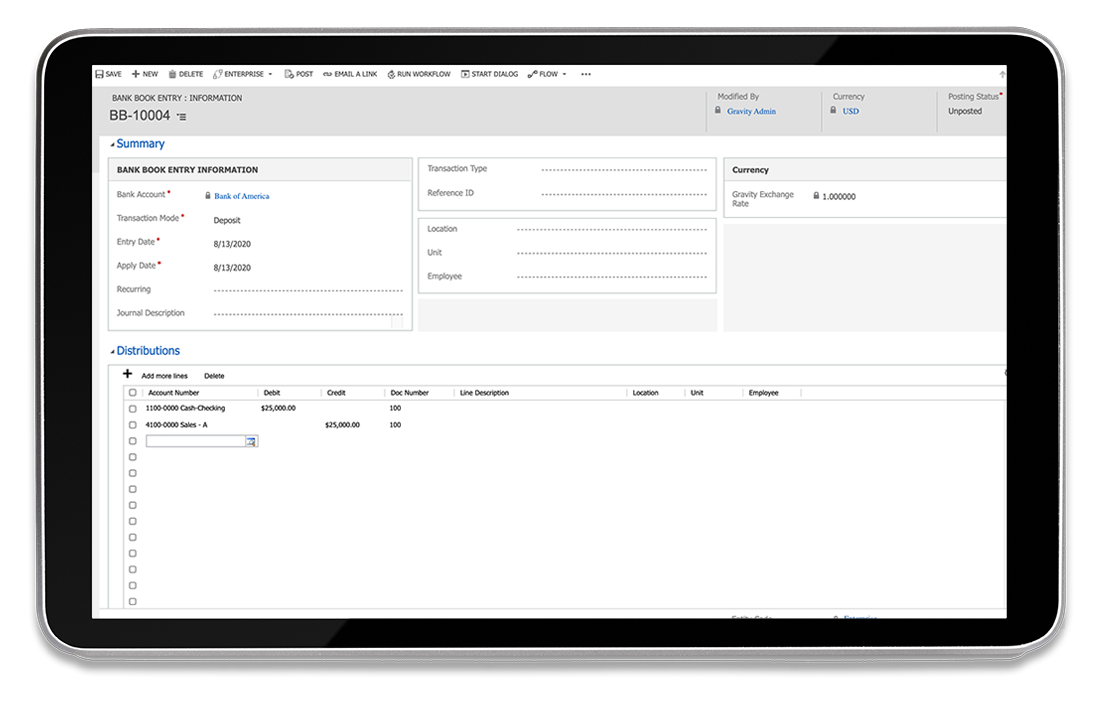
    Screenshot of Gravity Software's Bank Book Entry screen, displaying bank transaction entries and reconciliation options.
  • Connect bank and credit-card activity to Gravity
  • Connect bank and credit-card activity to Gravity

    Illustration representing credit-card transaction activity flowing into Gravity Software

    Gravity Software allows finance teams to bring bank and credit-card transaction activity into Bank Book Management, where it can be matched, processed and reconciled within the accounting system.

    Bank aggregation is available through Plaid and Finicity for supported financial institutions in North America. When a financial institution is not supported, transaction activity can be imported manually.

    For details about connectivity, supported financial institutions and how bank aggregation works, explore Gravity's bank aggregation with Plaid and Finicity.

  • See how Gravity customers save time on bank reconciliation
  • See how Gravity customers save time on bank reconciliation

    tera-carpenter-head-shot

    Dr. Tavel Family Eye Care, a multi-entity healthcare organization with 10 entities, was using Sage 100 before moving to Gravity Software. Its outdated, server-based accounting system contributed to inefficient and heavily manual processes, including reconciling expenses as part of a month-end close that extended beyond 30 days.

    After moving to Gravity, the accounting team streamlined the process of matching bank records with transactions in its accounting system. Bank transactions and payables became part of the team's ongoing accounting workflow rather than something addressed primarily during the close process.

    The organization ultimately reduced its month-end close from more than 30 days to 10–15 days.

    “With all the time we’re saving on bank reconciliation, month-end close, and other routine tasks, we can do more financial analysis, budgeting, and providing valuable feedback to the company on strategic direction”

    - Tera Carpenter, Vice President of Finance & Hr, Dr Tavel Family Eye Care

    Read the Dr. Tavel Family Eye Care customer story

  • Bank reconciliation resources
  • Bank reconciliation resources

    G2 'Users Love Us' badge, recognizing Gravity Software for its high customer satisfaction with an average rating of 4.0 stars or higher

    Continue exploring how Gravity Software helps finance teams reduce manual accounting work, manage bank activity and improve financial processes across growing multi-entity organizations.

    Bank reconciliation mistakes growing companies should avoid

    Learn about common bank reconciliation mistakes that can lead to missing transactions, inaccurate cash balances and unnecessary manual work.

    How to complete a bank reconciliation in 3 minutes

    See how Gravity Software helps accounting teams use automated matching and bank rules to make the reconciliation process more efficient.

    What is bank account aggregation?

    Learn how bank account aggregation brings bank and credit-card transaction activity into accounting systems and what finance teams should consider when evaluating connectivity.

  • Frequently asked questions
  • Frequently asked questions

    Icon of a person with headset guiding businesses through selecting multi-entity accounting software with Gravity Software

    Find answers to common questions about Gravity Software's Bank Book Management functionality, including automated bank matching, bank rules, transaction creation, multi-entity reconciliation and managing bank and credit-card activity.

    arrow

    What is Bank Book Management in Gravity Software?

    Once bank activity is available in Gravity, the system can automatically identify transactions that meet established matching criteria, including corresponding amounts and relative transaction dates. Users can review and approve suggested matches through Gravity's Bank Matching Screen.

    How does automated bank matching work in Gravity Software?

    Once bank activity is available in Gravity, the system can automatically identify transactions that meet established matching criteria, including corresponding amounts and relative transaction dates. Users can review and approve suggested matches through Gravity's Bank Matching Screen.

    Can Gravity match one bank transaction to multiple accounting transactions?

    Yes. Gravity can match one bank transaction to multiple transactions recorded in Gravity. This is useful for activity such as grouped deposits, where a single amount appearing at the bank corresponds to multiple accounting transactions.

    Can I manually match transactions that Gravity doesn't automatically match?

    Yes. When a transaction does not meet the criteria for an automated match, users can manually identify and match the appropriate transaction. This allows finance teams to automate routine matching while focusing their attention on exceptions that require additional review.

    Can Gravity create accounting transactions from bank activity?

    Yes. When downloaded bank activity does not already have a corresponding transaction in Gravity, users can create accounting transactions directly from that activity. This can include journal entries and, where applicable, accounts payable and accounts receivable transactions.

    How do bank rules work in Gravity Software?

    Gravity's bank rules can create accounting transactions based on established criteria such as words, amounts and bank accounts. Rules can be applied automatically or manually, and users can process applied rules in bulk.

    Can Gravity reconcile credit-card transactions?

    Yes. Bank Book Management can be used with bank and credit-card transaction activity, allowing accounting teams to match existing transactions, create transactions when appropriate and complete the reconciliation process.

    How does Gravity support bank reconciliation across multiple entities?

    Gravity is designed for organizations managing multiple entities within one accounting system. Finance teams can work with the entities and bank accounts they have permission to access and reconcile activity at the individual bank-account and entity level without maintaining a separate accounting database for every company.

    Can accounting teams review suggested bank matches before approving them?

    Yes. Gravity presents potential transaction matches for users to review and approve, giving accounting teams control over the reconciliation process rather than automatically accepting every suggested match.

    How does Gravity handle bank transactions that don't require further action?

    Transactions that do not require additional accounting or reconciliation action can be ignored. Combined with automated matching and bank rules, this helps accounting teams focus on activity that requires review.

    Does Gravity Software support multi-currency bank accounts?

    Yes. Gravity supports multi-currency bank account reconciliation, helping organizations operating with multiple currencies manage applicable bank activity within the accounting system.

    How does bank and credit-card activity get into Gravity Software?

    Gravity supports bank aggregation through Plaid and Finicity for supported financial institutions in North America. When a financial institution is not supported, transaction activity can be imported manually.

    For more information about connectivity and supported financial institutions, explore Gravity's bank aggregation with Plaid and Finicity.

  • See Gravity's bank reconciliation software in action
  • See Gravity's bank reconciliation software in action

    Illustration representing the Gravity Software 11-minute demo video

    See how Gravity Software helps growing multi-entity organizations automate bank reconciliation, manage bank and credit-card activity and reduce manual accounting processes within one connected system.

    Schedule a demo to see how Gravity can support your organization's bank reconciliation and multi-entity accounting needs.

    You can also watch our 11-minute Gravity Software demo for an overview of the platform's accounting, reporting and automation capabilities.

    schedule a demo with Gravity Software