
Build a scalable chart of accounts across multiple entities

Standardize company codes, account segments, and dimensions for consistent financial reporting across every entity—without creating an oversized chart of accounts.

schedule a demo with Gravity Software
x

See how Gravity compares to leading cloud accounting solutions. Request a demo.

  • Create a consistent reporting foundation across every entity
  • Create a consistent reporting foundation across every entity

    Multi-entity chart of accounts and financial reporting structure in Gravity Software

    A well-designed chart of accounts is the foundation of accurate financial reporting. But as an organization adds companies, locations, departments, projects, or funds, forcing every reporting requirement into the account number can create an oversized structure that is difficult to maintain.

    Gravity Software combines separate company codes, a segmented chart of accounts, and flexible dimensions. This allows finance teams to standardize reporting across entities while preserving the detail needed to analyze results by department, location, project, employee, fund, region, or another business attribute.

    With one multi-entity accounting platform, your team can maintain a consistent financial reporting structure, simplify consolidations, and adapt reporting as the organization grows—without rebuilding the chart of accounts every time reporting needs change.

    Schedule a personalized demo to see how Gravity can support your financial reporting requirements.
  • How Gravity structures financial data for multi-entity reporting
  • How Gravity structures financial data for multi-entity reporting

    Gravity Software logo - Multi-entity financial reporting structure

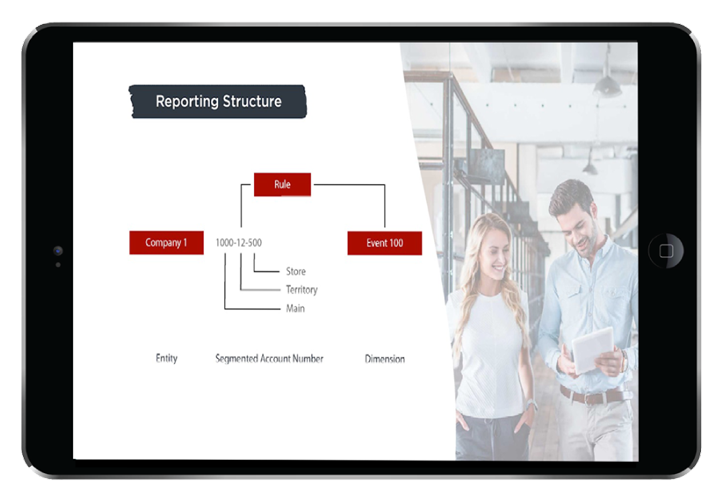
    Gravity separates the information needed for financial reporting into three building blocks. This approach gives finance teams greater control over reporting without forcing every company, location, department, or other business attribute into the chart of accounts.

    • Company codes identify separate legal entities without embedding the entity in the account number.
    • Account segments organize relatively stable reporting elements, such as natural accounts, territories, or locations.
    • Dimensions track flexible or changing attributes, such as departments, projects, employees, physicians, funds, or programs.

    Together, these elements support consistent reporting across multiple entities while allowing each organization to capture the level of detail it needs. They also provide a structured foundation for consolidated financial reporting, cross-company analysis, and more informed decision-making.

    Watch the video to see how Gravity brings company codes, account segments, and dimensions together within transactions and financial reports.

    Ready to take action?

    See how Gravity’s financial reporting structure transforms raw data into actionable insights across all your entities. Schedule your demo today!

    Diagram of Gravity Software Financial Reporting Structure
  • Add reporting detail without expanding the chart of accounts
  • Add reporting detail without expanding the chart of accounts

    Financial report with charts and a magnifying glass

    Traditional accounting systems often force companies, locations, departments, projects, employees, and other reporting attributes into the chart of accounts. As reporting needs grow, the account structure becomes increasingly difficult to manage.

    Gravity separates legal entities, stable account segments, and more flexible dimensions so each type of financial information is organized appropriately.

    Reporting element Purpose Examples
    Company code Identifies the legal entity Parent company, subsidiary, operating company
    Account segment Organizes relatively stable reporting categories Natural account, territory, location
    Dimension Tracks flexible or changing business attributes Department, project, employee, physician, fund

    For example, a healthcare organization may use company codes for separate legal entities and an account segment for each location. Individual physicians can be tracked as dimensions because they may work across locations or change over time. This provides detailed reporting by physician without adding new account numbers whenever staffing changes.

    The result is a more manageable chart of accounts and a flexible financial reporting structure that can adapt as your organization grows.

  • Turn structured financial data into flexible reports
  • Turn structured financial data into flexible reports

    Adjustable controls representing customizable financial reporting

    A well-designed reporting structure allows finance teams to analyze the same financial data from different perspectives without rebuilding reports or maintaining separate spreadsheets.

    Gravity’s Advanced Financial Statements report writer brings company codes, account segments, and dimensions together in customizable row-and-column financial reports. Depending on the reporting requirement, your team can:

    • Report on one company, selected companies, or all companies.
    • Compare entities, locations, departments, projects, funds, or other dimensions.
    • Combine account segments and dimensions within the same report.
    • Create profit and loss statements by location, department, employee, physician, or another business attribute.
    • Drill into the financial details behind reported balances.
    • Produce consistent individual-entity and consolidated financial statements.

    Because the reporting structure is connected to the underlying accounting data, finance teams can generate current reports without manually exporting, mapping, and combining information from separate company files.

    For additional analysis and visualization, Gravity also connects financial data with Power BI and Excel.

  • Improve reporting accuracy with dimension rules
  • Improve reporting accuracy with dimension rules

    Segmented financial data representing reporting dimensions and rules

    Flexible reporting depends on financial data being classified consistently when transactions are entered. Gravity allows organizations to establish rules that determine when a dimension is available, optional, or required for a specific account.

    For example, an employee or department dimension may not apply to a cash account but may be required whenever a salary or expense account is used. Gravity applies those rules across transaction screens, including bills and journal entries, helping finance teams:

    • Capture the reporting detail required for each transaction.
    • Reduce missing or inconsistent dimension values.
    • Apply the same classification rules across multiple entities.
    • Improve the reliability of financial and management reports.
    • Add dimensions as reporting requirements change.

    This accounting automation strengthens data consistency at the point of entry, giving finance leaders greater confidence in the reports used for consolidation, analysis, and decision-making.

    Dimension rules in practice

    A department or employee dimension may not apply to a cash account but may be required for a salary or operating expense account. Gravity applies the appropriate rule based on the account selected, helping users capture consistent reporting details when entering bills, journal entries, and other transactions.

  • See how BII accelerated consolidated financial reporting
  • See how BII accelerated consolidated financial reporting

    Shila Singh, Head of Finance at the British Institute of Innkeeping

    After more than 25 years with Sage 50cloud, the British Institute of Innkeeping (BII) was preparing consolidated group accounts in an Excel workbook with nearly 50 tabs. Its finance team also had to log in and out of Sage 50cloud whenever users needed to process transactions or view information for a different entity.

    BII selected Gravity Software to manage four entities in one cloud-based accounting system, simplify consolidation, and give its finance team more flexibility through reporting dimensions.

    “It’s changed our reporting timetable massively. We can spin out consolidated reports very quickly without having to log out and log back into a different entity every time.”

    Shila Singh, Head of Finance, British Institute of Innkeeping

    With Gravity, BII can:

    • Generate consolidated reports without switching between separate entity files.
    • Reduce the time required to prepare monthly financial reports.
    • Produce accounts by Day 5 or earlier with greater confidence in the numbers.
    • Analyze financial information using flexible reporting dimensions.
    • Eliminate spreadsheet-based consolidated reporting with nearly 50 tabs.

    Read the BII case study  to see why the organization moved from Sage 50cloud to Gravity Software and how the change improved reporting and accounting efficiency.

  • Extend reporting with Microsoft analytics and AI
  • Extend reporting with Microsoft analytics and AI

    Microsoft 365 Copilot logo representing AI-assisted financial analysis

    A consistent financial reporting structure gives analytics, automation, and AI tools more reliable data to work with. Because Gravity is built on the Microsoft Power Platform, finance teams can extend their reporting through familiar Microsoft applications.

    • Power BI transforms financial data into interactive dashboards and visual analysis.
    • Excel gives users a familiar environment for additional analysis and presentation.
    • Microsoft 365 Copilot helps authorized users work with accounting information through natural-language prompts in Microsoft applications such as Outlook, Teams, and Excel.
    • Power Automate supports connected workflows and approvals across financial processes.
    • Role-based access helps ensure users can only work with the financial information they are authorized to view.

    By combining a structured multi-entity chart of accounts with the Microsoft ecosystem, Gravity gives finance teams a stronger foundation for business intelligence, accounting automation, and AI accounting tools.

    See how Microsoft 365 Copilot works with Gravity to help finance teams access information and work more efficiently.

    Better structure supports better insights

    AI and analytics are only as reliable as the financial data behind them. By organizing transactions consistently through company codes, account segments, and dimensions, Gravity provides a stronger foundation for Power BI reporting, accounting automation, and AI-assisted analysis with Microsoft 365 Copilot.

  • Explore financial reporting resources
  • Explore financial reporting resources

    G2 'Users Love Us' badge, recognizing Gravity Software for its high customer satisfaction with an average rating of 4.0 stars or higher

    A scalable chart of accounts is one part of a connected multi-entity reporting strategy. Explore these resources to learn more about financial reporting, dimensions, consolidation, and multi-entity accounting with Gravity Software.

    Financial reporting software

    See how Gravity helps finance teams create customizable financial statements, automate report distribution, and provide decision-makers with timely financial information.

    Dimensional reporting

    Discover how dimensions and hierarchical dimensions help organizations analyze financial performance without expanding the chart of accounts.

    Consolidated financial reporting

    Explore how growing organizations can combine financial results across entities, reduce spreadsheet dependence, and gain clearer organization-wide visibility.

    Multi-entity accounting guide

    Discover how Gravity Software simplifies managing multiple entities with real-time reporting, consolidation, and seamless integrations.

    Cloud collaboration with Microsoft 365

    See how Gravity connects accounting and financial reporting with familiar Microsoft 365 applications to support collaboration, analysis, and more efficient workflows.

    11-minute highlights of Gravity

    Watch an 11-minute highlights video to see Gravity Software in action, including multi-entity accounting, financial reporting, automation, AI, and Microsoft integrations.

  • Frequently asked questions about multi-entity charts of accounts and reporting
  • Frequently asked questions about multi-entity charts of accounts and reporting

    Gravity Software specialist answering questions about multi-entity charts of accounts and financial reporting

    These answers explain how Gravity uses company codes, account segments, and dimensions to build a consistent financial reporting structure across multiple entities.

    arrow

    What is a multi-entity financial reporting structure?

    A multi-entity financial reporting structure is the framework used to organize accounting data consistently across separate companies. In Gravity, that framework combines company codes, a segmented chart of accounts, and dimensions so finance teams can produce entity-level and consolidated reports from the same system.

    How does Gravity structure the chart of accounts across multiple entities?

    Gravity maintains the company code as a separate data element instead of forcing the entity into the account number. Organizations can then use account segments for relatively stable reporting categories and dimensions for more flexible business attributes.

    This approach supports a standardized multi-entity chart of accounts while preserving the detail each entity needs.

    What is the difference between an account segment and a dimension?

    An account segment generally represents a stable part of the chart of accounts, such as a natural account, territory, or location. A dimension tracks information that may change more frequently, such as a department, project, employee, physician, program, or fund.

    Using dimensions helps organizations gain detailed financial insight without continually adding new account numbers.


    Can dimensions be added after the reporting structure is established?

    Yes. Gravity allows organizations to introduce dimensions as reporting requirements change. A finance team might begin with company and account-level reporting and later add dimensions for departments, projects, employees, funds, or other business attributes.

    Can Gravity require dimensions for specific accounts?

    Yes. Dimension rules can determine whether a dimension is unavailable, optional, or required for a particular account. For example, an employee or department dimension may be required for a salary account but unnecessary for a cash account.

    These rules help users capture consistent reporting details when entering transactions.

    Can Gravity report across companies, account segments, and dimensions?

    Yes. Gravity’s Advanced Financial Statements report writer can combine company codes, account segments, and dimensions within customizable row-and-column financial reports. Finance teams can report on one company, selected companies, or all companies and compare results by location, department, project, fund, employee, or another reporting attribute.

    Does Gravity support multi-currency financial reporting?

    Yes. Gravity supports multi-currency accounting so organizations can record transactions in different currencies and produce financial reports using their selected reporting currency. This supports multi-entity organizations operating across countries and regions.

    How does Gravity connect financial reporting with Microsoft tools?

    Gravity connects financial reporting with Excel, Power BI, Power Automate, and Microsoft 365 applications. Finance teams can analyze financial information, create visual dashboards, and automate connected workflows using familiar Microsoft tools. Authorized users with the appropriate license can also use Microsoft 365 Copilot to work with accounting information through natural-language prompts.

  • Build a reporting foundation that scales with your organization
  • Build a reporting foundation that scales with your organization

    Financial reporting dashboard showing scalable organizational growth

    The way financial data is structured today affects how easily your organization can add entities, respond to new reporting requirements, and deliver accurate information to decision-makers tomorrow.

    Gravity Software gives finance teams a flexible framework that:

    • Standardizes the chart of accounts across multiple entities.
    • Separates legal entities from the account-number structure.
    • Uses dimensions to capture detailed reporting information without adding unnecessary accounts.
    • Applies dimension rules to improve data consistency at the point of entry.
    • Supports entity-level, comparative, and consolidated financial reporting.
    • Adapts as companies, locations, departments, projects, funds, and reporting requirements change.

    Build a multi-entity financial reporting structure that provides consistency across your organization without limiting how individual entities operate.

    Schedule a personalized demo to see how Gravity can support your chart of accounts and financial reporting requirements.