Microsoft Power BI Training for Gravity Software Users

Webinar-Location-Icon Online Training

x

Get more info on Microsoft Power BI training for Gravity Software users.

  • Why attend Power BI + Gravity Software training?
  • Why attend Power BI + Gravity Software training?

    Microsoft Power BI logo representing reporting and dashboard training for Gravity Software users”

    Learn. Build. Distribute. Empower.

    Unlock the full value of your Gravity Software investment by learning how to harness Microsoft’s  Power BI for powerful,  real-time financial and operational reporting. Whether you're just getting started or want to level up your skills, these hands-on sessions will help you create and share impactful dashboards.

    These sessions are open to all Gravity users and designed to give your team the skills they need to build their own reporting toolkit. From understanding the basics to distributing custom reports across your organization, you’ll walk away ready to turn data into decisions.

    In these hands-on training sessions, your team will:

    1

    Master the Power BI fundamentals

    Get up to speed with the Power BI interface, tools, and capabilities. You'll learn how it fits within the Microsoft Power Platform ecosystem and how to make it work for your organization.

    2

    Connect directly to your Gravity data

    Learn how to access and query data from the Gravity Dataverse, giving you control over your financial and operational insights without relying on IT.

    3

    Build and customize reports with confidence

    Design visually compelling dashboards and reports tailored to your business needs. Use filters, slicers, and charts to bring your data to life.

    4

    Share insights with your entire organization

    Distribute reports to Gravity users—or external stakeholders—securely and efficiently. Gain full control over access, delivery, and collaboration.

  • Option 1: Power BI training workshop
  • Option 1: Power BI training workshop

    Learn. Build. Distribute. Empower.

    Unlock the full value of your Gravity Software investment by learning how to harness Microsoft’s  Power BI for powerful,  real-time financial and operational reporting. Whether you're just getting started or want to level up your skills, these hands-on sessions will help you create and share impactful dashboards.

    These sessions are open to all Gravity users and designed to give your team the skills they need to build their own reporting toolkit. From understanding the basics to distributing custom reports across your organization, you’ll walk away ready to turn data into decisions.

    Remote Session 1 (2 Hours)

    1

    Introduction to the Gravity Entity Relationship Diagram (ERD) and metadata

    Understand how Gravity Software’s data is structured in the Microsoft Dataverse—including how key tables connect and where to find important financial and operational data.

    2

    Understanding your accounting data structure

    Learn how filters, relationships, and data hierarchies work across companies and modules to power accurate and insightful reporting.

    3

    Overview of Power BI for Gravity users

    Discover the benefits of Power BI for multi-entity accounting, and how it compares to other reporting options like ADFS and custom-built reports.

    4

    Desktop vs. mobile considerations

    Explore how Power BI dashboards behave across devices and what to keep in mind when designing for different user experiences.

    5

    Connecting Power BI to your Gravity environment

    Step through how to securely connect Power BI to your Gravity Dataverse and begin accessing your live business data.

    6

    Navigating Power BI and creating your first report

    Learn how to use the Power BI interface to design your first report or dashboard and understand key elements like visuals, filters, and data fields.

    7

    Report sharing and user access basics

    Get a foundational understanding of how to publish and securely share reports with Gravity users and other stakeholders.

    8

    Take-home exercise: Build your first Power BI report

    Apply what you’ve learned by building a report tailored to your organization. The Gravity Power BI Team is available via email for support as needed.

  • Remote Session 2 (2 Hours, two weeks later)

    1

    Live Q&A and review of your first report

    Bring your questions and walk through your Power BI report with our team. Get feedback and resolve any blockers.

    2

    Enhancing your first Power BI report

    Add additional visuals, filters, or data points to expand the value of your first report with hands-on support.

    3

    Distributing reports to your users

    Learn how to publish and share reports securely with Gravity Software users and other relevant stakeholders.

    4

    Planning your next Power BI report

    Collaborate on the next reporting goal and leave with a clear roadmap to keep building your Power BI toolkit.

  • Option 2: Custom report & dashboard development
  • Option 2: Custom report & dashboard development

    Business intelligence icon representing custom Power BI report and dashboard development for Gravity Software

    Perfect for teams that want fully supported, expert-built reporting solutions with minimal internal effort.

    INVESTMENT

    Fixed fee or T&M based up report / dashboard complexity.

    1

    Consult on goals and access requirements

    We’ll start by understanding your specific reporting objectives and who needs access, so your dashboard aligns with your business needs from day one.

    2

    Define the scope and gain your approval

    Before any development begins, we’ll outline what’s included—timeline, components, and outputs—so expectations are clear and mutually agreed upon.

    3

    Develop a prototype and gather feedback

    You’ll receive a working version of your report or dashboard to review. We’ll walk through it together, gathering your input and suggested refinements.

    4

    Finalize the report or dashboard

    Using your feedback, we’ll polish and complete the report or dashboard, ensuring it’s accurate, visually aligned, and fully functional.

    5

    Distribute to Gravity users

    Once finalized, we’ll help you publish and share the report with your Gravity Software users, making sure it reaches the right people with the right permissions.

  • Which option is right for you?
  • Which option is right for you?

    Icon of a balanced scale symbolizing comparison between Power BI training and custom reporting options
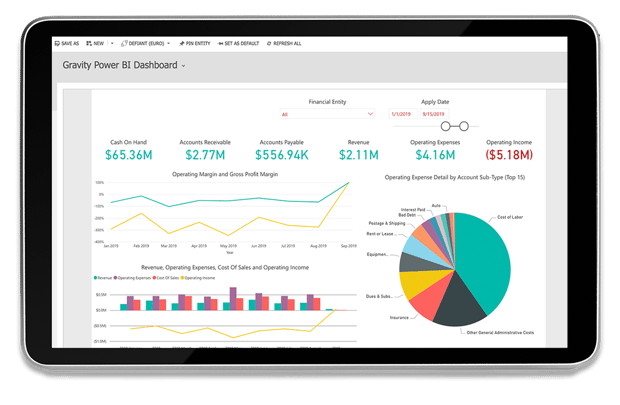
    Example of a Power BI dashboard built in Gravity Software showing financial report visuals

    • Choose Option 1 if you want to empower your internal team to build reports and dashboards in-house.

    • Choose Option 2 if you prefer Gravity’s experts to create reports for you.

    Have questions about which path fits your team best? We’re happy to guide you.

  • Expand your capabilities with Gravity's advanced features
  • Expand your capabilities with Gravity's advanced features

    Gravity Software advanced features icon representing expanded functionality for growing businesses

    Once you’ve mastered Power BI reporting, consider unlocking even more value from your Gravity Software platform. These advanced modules are built to scale with your business and integrate seamlessly with your existing financials.

    1

    Accounts Payable (AP) Automation

    Streamline invoice approvals, match documents, and pay vendors faster—all within one connected platform.

    2

    Copilot AI Integration

    Enhance decision-making with AI-powered suggestions, automation, and natural language queries built directly into Gravity Software. Leverage Microsoft's AI to streamline workflows and reduce time spent on manual tasks.

    3

    Direct ACH Payment Processing

    Securely send vendor payments without the need for physical checks or third-party processors.

    4

    Fixed Assets

    Track assets across multiple books and entities, with built-in lifecycle and depreciation schedules.

    5

    Payment Portal

    Enable customers to pay online through a secure, branded portal—accelerating cash flow and reducing manual work.

    6

    Remote Check Printing

    Print and mail checks directly from Gravity Software—no need for in-house printers or postage.

    7

    Requisition Management

    Give employees a portal to submit purchase requests and route them for approval before they become expenses.

    8

    Revenue Management

    Automatically manage multi-entity revenue schedules and stay compliant with ASC 606 standards.

    9

    Subscription Billing

    Automate recurring invoices, payment schedules, and contract-based revenue streams.

    10

    Looking to connect even more tools?

    Leaders must evaluate recovery and anticipated financial performance in an environment filled with lingering uncertainty and re-evaluating as conditions change.

    68% of CFOs say they need real-time financial processes
    to prepare for the future, but only 16% have them in place. (Accenture)

  • Client spotlight
  • Client spotlight

    Rette Rankin, Controller at InDevCo Inc., featured in Gravity Software client spotlight

    “Gravity streamlined our workflow process and consolidated all of our companies into one user-friendly database. With Power BI dashboards tailored to our needs, we gained better visibility without needing to hire another accountant.”

    Rette Rankin, Controller, InDevCo Inc.